Behind the cabinet, out of sight, how can you tell by feel if a connector is fully plugged in?
When connecting and disconnecting fiber optic connectors in confined spaces with obstructed views or limited hand access (e.g., behind cabinets, inside sealed equipment bays), visual confirmation of alignment and latching is impossible. This process, which relies entirely on the physical design of the connector for guidance and completion, is known in engineering as “Blind Mating”.
To precisely determine if a connector is properly seated behind an unseen cabinet, one must not rely on brute force. Instead, the process depends on the connector’s carefully engineered physical mechanisms: “Self-Alignment”, “Tactile Feedback”, and “Retention & Latch”.
Different types of fiber optic connectors exhibit significant physical differences in their “feel” and operational nuances:
I. Push-Pull Latching Connectors (e.g., LC, SC) – Ideal for Blind Mating
These connectors feature a push-pull latching structure, specifically designed for blind mating and high-density deployments. Their tactile feedback is the most intuitive:
- Tactile Glide-in: Roughly align the connector with the adapter口. During the first half of insertion, you will feel the guide rails on the sides of the adapter aligning with the connector, restricting its wobble.
- “Click” Tactile Vibration Feedback: Continue pushing firmly inward. The instant the connector is fully seated, the plastic tab of an LC connector or the sliding sleeve of an SC connector will compress and then spring back into the latch slot. At this moment, your hand will perceive a momentary release of force accompanied by a slight vibration (often with an audible crisp “click”).
- Reverse Pull Confirmation (Crucial Step): After insertion, pinch the fiber pigtail (Note: do not pinch the housing; the SC housing is the unlock sleeve) and gently pull outwards. If you feel a firm physical resistance and the connector does not budge, it means the self-latching clip has fully engaged. If it comes loose with a slight pull, it was not fully inserted.
II. Threaded Coupling Connectors (e.g., FC) – Requires “Find Key, Then Tighten”
FC connectors utilize a threaded coupling mechanism. During blind mating, directly rotating the coupling nut can easily lead to end-face abrasion or thread jamming. A two-step tactile judgment is essential:
- Key-finding Tactile Sensation: The FC connector body has a protruding key, and the adapter has a corresponding keyway. When blind mating, insert the metal connector into the adapter. Crucially, do not rotate the outer coupling nut at this stage. Gently rotate the entire connector body with your fingers. At a specific angle, you will suddenly feel the connector sink inwards by approximately 1 \ \text{mm} \sim 2\ \text{mm}. This indicates that the key has successfully entered the keyway, achieving angular alignment.
- Thread Limit Hard Feedback: While maintaining the connector body’s position, rotate the outer knurled metal nut clockwise. Initially, resistance will be very low, but as the threads engage, it will increase rapidly. When you feel a hard “metal-on-metal collision limit” and the nut can no longer move, it signifies it is fully tightened.
III. Bayonet Connectors (e.g., ST) – Press and Twist to Lock
- Key-finding and Spring Compression Sensation: Similar to FC, rotate the connector until the key slides into the slot. When pushing inwards, you will distinctly feel the linear resistance of the internal spring compression.
- Twist-to-Lock Tactile Sensation: While maintaining inward pressure, rotate the outer bayonet coupling approximately 1/4 turn clockwise until you feel a sudden change: the bayonet’s pin slides to the bottom of its slot, the spring force is instantly released, and the outer ring is locked. Upon releasing, if the connector does not spring back outwards, it is locked.
IV. OFSCN® Official High-Precision Blind Mating and Testing Components Recommended
For complex cabinet deployments or demanding industrial/scientific testing environments, to ensure absolute reliability in blind mating and reduce end-face abrasion caused by eccentricity, it is recommended to use OFSCN® standard components with precision manufacturing tolerances and excellent tactile feedback:
-
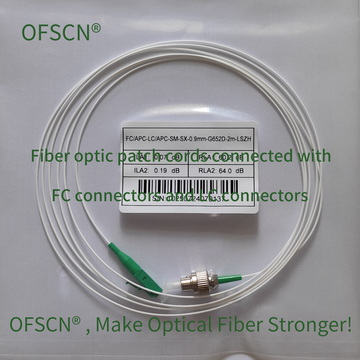
OFSCN® Standard Fiber Patch Cord: Standard fiber optic patch cords produced by Beijing Dacheng Yongsheng Technology Co., Ltd., offering high-precision LC, SC, FC, and other interfaces. The housing and latch dimensions have extremely small manufacturing tolerances, and the plug-in latch tactile feedback is clear, making them ideal for high-density cabinet blind mating.
-
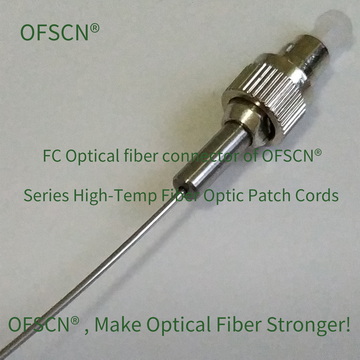
OFSCN® 120℃ Fiber Optic Connector: Precision fiber optic connectors with a temperature resistance up to 120°C, including FC/PC, FC/APC, ST/PC, ST/APC, and LC/PC, SC/PC at room temperature. They offer excellent mechanical guidance in harsh and confined environments.
-
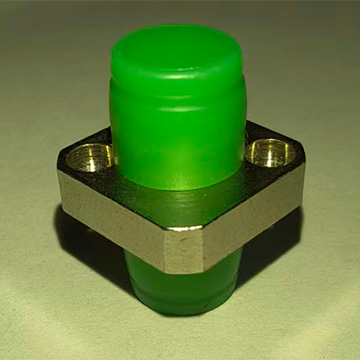
OFSCN® High Temperature Resistant Fiber Optic Adapter: Precision fiber optic adapters with a temperature resistance up to 300°C. Internally, they employ a high-precision zirconia ceramic alignment sleeve, providing perfect linear guidance for blind mating, thus ensuring stable insertion loss (typically \text{IL} \le 0.3\ \text{dB}).
 Blind Mating Engineering Practice Tips:
- Dust Prevention is Paramount: Cabinet rears are often dusty, and connectors are left exposed in the air for extended periods during blind mating. Be sure to remove the fiber optic dust cap only at the very last second before attempting insertion.
- Absolutely No Forceful Pushing: If you encounter abnormal, stiff, and inelastic resistance during insertion or rotation, it means the connector is misaligned or the key is not engaged. Immediately retract, readjust the angle slightly, and try again. Forcing it can cause the ceramic ferrule to crack or the fiber end-face to shatter.